


HPT Universal Credits (*Serial Number & Email Required*)
Description
How many credits do I need?
| Vehicle | ECM | TCM |
| 17-23 L5P Duramax | 4 | 4 |
| 24+ L5P Duramax | 8 | 4 |
Universal Credits
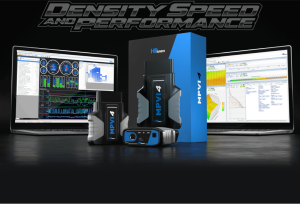
HP Tuners uses a credit-based licensing system. Credits are used as currency to purchase licenses for the different modules in a vehicle. Licensing a module gives you the ability to tune it. The number of credits necessary to purchase a license varies depending on the vehicle.
Many vehicles are (2) credits for licensing the ECM/PCM, and may have additional options such as a TCM, FICM, or CCM.
You can find a complete list of supported vehicles and credit cost on our supported vehicle page here.
Vehicle licenses are tied to the VIN, PCM OS, and PCM Serial Number. If those values don’t change, the vehicle will remain licensed on that interface and can be tuned indefinitely. One interface can store thousands of licenses and can be used to tune all the vehicles we support.
Once you purchase an MPVI3/4 you can read, edit, and save files without purchasing credits. You don’t have to license a module until you are ready to write a new file to the vehicle. The MPVI3/4 also offers the ability to tune remotely by sending a tune file via email or using Tune Delivery Network for professional tuning shops.

To activate Universal Credits for your MPVI3/4:
- Download and install the latest version of VCM Suite here.
- Connect your MPVI3/4 to your laptop/PC.
- While connected to the internet, load VCM Editor and select HELP > RESYNC INTERFACE.
Reminder, you must be connected to the internet as this process will also update your interface’s firmware to the latest version.
Should you have any issues resyncing your interface, please submit a support ticket here.
NOTE: All digital product sales including credits are final, under no circumstances can a refund be given for any digital products. Please ensure you check how many credits you have and require before you complete your purchase.
Credits Explained
How do I find my Verification ID?
1. Plug your MPVI2, 2+, or 3 into your computer with the included USB cable.
2. Open VCM Editor or VCM Scanner.
3. In the menu bar, select "HELP > MPVI2/2+/3 Verification Code". The software will generate the code in a pop-up window.

Details
- UC-0000
- UC-0000
- HP Tuners
- New
Customer Reviews
 Total Reviews (0)
You must login to post a review.
Write the First Review!